
MAnE
MAnE™, the Mission Analysis Environment, is a software system used to design and optimize space exploration missions with targets beyond the Earth-moon system.
The software evaluates only heliocentric transfers and, therefore, is not suitable for any portion of a mission that targets a natural satellite of a body. The software is considered to be appropriate for early- to mid-stage mission analyses where launch vehicle sizes, propellant requirements and basic mission timelines are defined.
MAnE combines two formerly separate SpaceFlightSolutions products into a new product with two similarly-purposed modules that are linked by a common user interface with small variations to accommodate the requirements of each module. Each of the modules perform trajectory and mission optimization functions, but for different types of propulsion systems.
The high-thrust module is used for conventional, chemical propulsion systems for which the thrust may safely be characterized as infinite, producing an instantaneous change in velocity. The low thrust module is used for electric propulsion systems that operate over finite periods of time, possibly accompanied by chemical propulsion units applied at launch and/or at the final target arrival.
Although packaged as a single product, the two modules are individually licensed so that one can tailor the fees to fit specific needs. Use the tabs to get more details about each of the products.
Overview
The MAnE High-thrust Module supports the analysis and optimization of multiple leg, heliocentric missions which employ conventional, high-thrust propulsion. Full optimization of missions with up to seventeen distinct legs is supported. Hereafter in the discussion of the high-thrust module, the product will be referred to simply as MAnE.
Starting in 1992 following the Space Exploration Initiative, the development of MAnE was begun to address the general absence of readily available, validated, documented and supported mission analysis tools within the industry. The objective was to introduce modern software design and presentation methodologies into the product to improve maintainability and usability and to give highest priority to program integrity. Since the first delivery of MAnE in 1994, the product has been upgraded many times to improve performance and expand capabilities. This latest version is the product of a complete re-write of the software using a modern development environment that yields higher resolution graphics and vastly improved convergence characteristics.
MAnE is now a well-recognized tool in the US space exploration program. It has been used as a primary mission design program for the funded Discovery programs NEAR, Contour, and MESSENGER and for the New Frontiers program New Horizons. It has also been used to design numerous missions for other Discovery and New Frontiers proposals.
Licensing of MAnE is required for each individual workstation on which the application is to be executed. Licenses are perpetual and include one year of support and version upgrades that are released during that time. Continuation of support is available via annual subscriptions. Contact SpaceFlightSolutions for current licensing and support fees for MAnE.
™MAnE is a trademark of Jerry L. Horsewood
Features
- A robust, flexible, multiple leg (up to 17) mission optimization program suitable for preliminary mission studies of both manned and unmanned solar system missions;
- Supporting toolbox applications to evaluate various events, conditions and information (such as nodal crossings, alignments, close approaches, and locations of solar system bodies) that are useful in the analysis of typical missions;
- Interfaces to the DE430 planetary ephemeris file and the comprehensive Dastcom5 ephemeris file of asteroids and comets that is maintained at JPL;
- Includes support for ephemeris files of small bodies in the Spice Kernel format;
- An option to interrogate the Dastcom5 comet/asteroid file for entries with characteristics satisfying a list of inequality constraints;
- Provisions to maintain multiple databases of orbital elements of user defined bodies;
- A graphics application to display contour (porkchop) plots from the data produced within an initial stage of the application’s operation;
- An internal graphics module for instantaneously displaying the ecliptic projections of planetary, asteroid and comet orbits and the spacecraft trajectory;
- A program to perform a variety of date conversions and simple math computations involving calendar and Julian dates and time intervals.
- Comprehensive spacecraft and propulsion system model permits detailed spacecraft component specification and distinct modeling of the propulsion system for each maneuver.
- Mission optimization criterion may be maximum net payload or minimum initial mass, total mission Δv or mission duration.
- Velocity loss estimates and multiple periapsis burns for planetary escape and capture may optionally be included and accounted for in the optimization process.
- Special situations, such as multiple revolution legs, hyperbolic heliocentric arcs, retrograde trajectory legs, and exact n-pi transfers (essential for analyzing repeated encounters of the same body) are fully supported.
- The end conditions which link trajectory legs may be represented by orbit capture and escape with specified or optimal stay time at the massive planets, powered or unpowered planetary swingby, rendezvous with asteroids and comets with fixed or optimal stay time, powered or unpowered flyby of small objects, or deep space burns, in any combination.
The User Interface
The current release of MAnE presents an entirely new GUI that incorporates a more intuitive design with improved functionality and aesthetics. It mirrors the design that was pioneered by the companion low-thrust module when it was first released as an independent SpaceFlightSolutions product. The GUI provides a common framework within which the many components of the environment are integrated. The framework provides an organized presentation of the input required for a given environment component and a convenient method to execute the component and retrieve the relevant results. This visual approach enhances understanding of the component and of the problem being addressed and significantly reduces instances of missing or erroneous inputs.
When MAnE is started, mission input data from the most recently executed case populates the input forms of the GUI. The initial form displayed is known as the Mission Overview form, an example of which is shown below. This form displays the itinerary of the mission as presently defined. Targets in the itinerary may be added, removed or changed. The icons in the target ribbon are active and are used to specify the target of interest at a given node. To assist new users, the purpose of each active control on all forms are described in a tooltip that is displayed when the mouse hovers over the control.
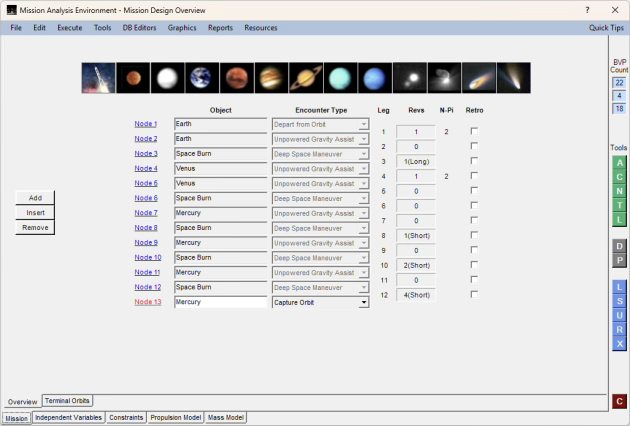
Several artifacts of the above form are common to all of the data entry forms. These include the bar menu at the top, the boundary value problem counts for the problem as currently defined, the toolbox of green, grey, blue and red buttons on the right, and the tabs along the lower border. The bar menu and sub-menu items provide access to all supporting applications, database editors, graphics features, data reports, documentation and help files. With few exceptions, accessing any of these features results in the display of an additional form with its own set of controls and data. The toolbox provides quick access to the most frequently used applications and functions, which are also accessible from the bar menu. The tabs provide a mechanism for categorizing input parameters into meaningful sub-groups. By processing the tabs from left to right, one is assured that the adaptive forms properly reflect the effects of choices and decisions made on prior forms.
The group of green icons in the toolbox are used to quickly access support applications frequently used while performing mission studies. From the top, the first three applications evaluate Alignments, Closest approaches, and Nodal crossings of any two bodies that occur within a specified time interval. Next is an application that converts between calendar and Julian Dates, and the final icon in the group guides the user in quickly inserting a deep space maneuver within a trajectory segment.
The two grey icons provide access to graphic functions available to the user. The upper icon is used to access the feature to Draw the orbits and trajectories of one or more missions, to annotate the drawing with text and arrows, and to save the drawings in various formats. The lower icon opens an application for drawing contour charts and porkchop plots of 16 variables.
The blue icons in the toolbox deal with the mission definition currently loaded in the user interface. From the top, their purposes are to Load a mission from the mission database into the user interface, Save the currently defined mission to the missions database, Update the independent variables to the values at the end of the most recent execution, open Reports of results from the most recent execution, and eXecute the mission currently defined in the user interface. The red button is used to close MAnE.
Additional features are available from the menus. These include interrogating ephemerides and displaying tabular and graphical results, searching for near encounters of small bodies along a trajectory, edit and maintain the Microsoft Access databases that support MAnE, access documentation at the form and application levels, and view output report descriptions.
Trajectory Optimization
The trajectory optimization program is based upon the matched conic model of the solar system; that is, heliocentric trajectories are computed under the assumption that the sun is the only attracting body. Once the terminal heliocentric velocities are known from the solution to Lambert’s Problem, the velocities relative to the terminal body are evaluated and equated to planetocentric conditions at infinity. This method is alternatively referred to as “matched asymptotes” or “zero sphere of influence patched conic”. It is generally regarded as sufficiently accurate for purposes of preliminary and mid-stage mission analysis and for propulsion system sizing and selection.
Trajectory optimization is achieved with a direct optimization method that supports both equality and inequality constraints. All prior releases of the MAnE high-thrust product implemented an indirect method based on the Calculus of Variations. The change to the new optimizer has yielded substantial improvements to convergence reliability while maintaining full satisfaction of constraints and delivering the true optimum value of the optimization criterion. It also eliminates solutions that settle on conditions known as saddle points where the solution represents a maximum with respect to one or more variables and a minimum with respect to others.
Utilities & Support Tools
MAnE was conceived as a workstation environment rather than just a trajectory optimization program. Consequently, much effort has been devoted to assuring that supporting tools needed to properly conduct typical mission studies are readily available. The tools included in the earlier versions of MAnE that are used most have been redeveloped in the new development environment and included here. Some remain to be completed and will be added when available. Following is a list of tools that are presently included:
- Store, retrieve, and maintain databases of accumulated mission input data files, launch vehicles, Spice kernel ephemeris files, and user defined body ephemeris files.
- Convert among various time and date units and perform date calculations.
- Calculate dates of opposition/conjunction alignments of any two bodies.
- Calculate dates of nodal crossings of one celestial body on the orbit of another celestial body.
- Calculate the dates of closest approach of any two celestial bodies.
- Evaluate the location of any celestial body on a given date.
- Solve Lambert’s problem for the conic section linking any two terminal points in a given transfer time with an option to select any time on that trajectory to insert a deep space maneuver in the mission itinerary.
- Query the JPL asteroid/comet ephemeris file to identify all among the 1 million+ entries with characteristics meeting specified criteria.
- Synchronize updated asteroid group files from Minor Planet Center with the JPL asteroid comet ephemeris file
- Display all information contained in the ephemeris files about a specific planet or other celestial body.
- Complete environment for drawing contour plots of 16 different variables over a specified range of departure and arrival dates.
- Generate path reports of position vs. time for the spacecraft and/or ephemeris bodies.
- Produce a wide variety of Excel reports for mission trajectories.
Visualization Support
We have taken advantage of the new development environment to create more and improved graphics to reveal to the analyst the visual context of what is behind the numbers being used and generated. For example, when one has entered values for all input variables required to begin iteration to optimize a mission and clicks the execute icon, a new form appears that displays the trajectory and the errors in the constraint values that result from those input values The following figure shows that form for a non-stop Earth-Mars-Earth trajectory the requires no propulsion after launch. Opportunities for this mission occur only twice every 15 years.
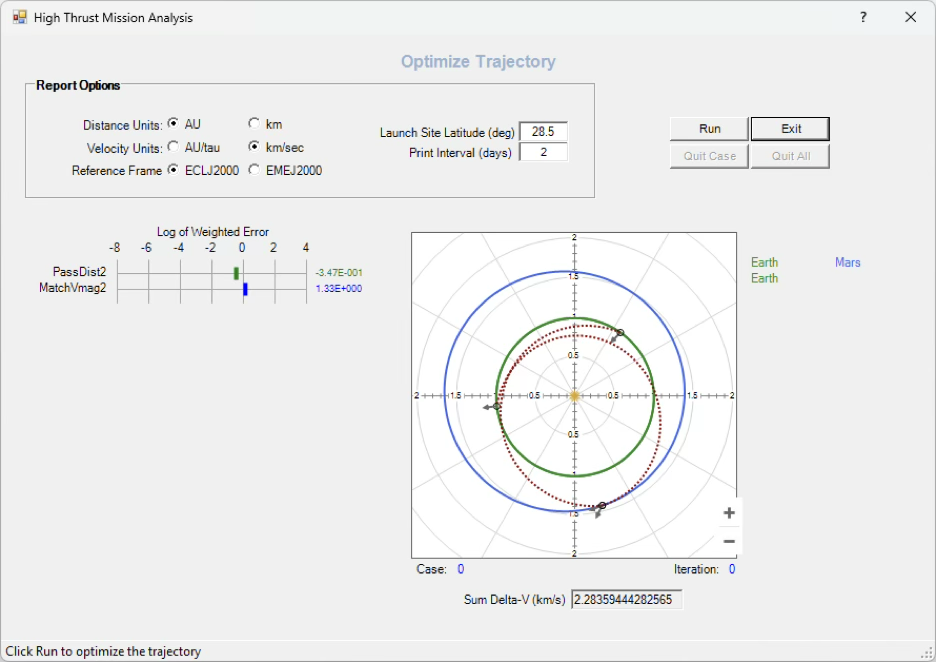
The bars on the scale to the left of the figure show the level of error in the two constraints that result with the initial input values of the independent variables. Upon convergence, they will move to the far left of the scale.
Once a mission has conversed, one will often want to create a drawing of the trajectory path along with the orbits of the bodies involved in the mission. Following is an example that shows the first few legs of a mission that sends two spacecraft to different destinations (Uranus and Neptune) with a single launch. The launch vehicle places both spacecraft on the same ΔVEGA loop and immediately separates the spacecraft. Then, separate deep space maneuvers are employed to target distinct Earth and Jupiter gravity assists for each spacecraft in a manner that allows each to proceed onward to its designated final destination. The figure includes text and arrow annotations to explain how the trajectories evolve.

Once the figure has been completed, it may be saved in any of three bitmap formats or as a script file. If saved in a script file, the figure may be reloaded in the above form and all annotations are editable. This is useful for correcting errors in the original figure or adding or removing content.
Another visualization aid is provided in the form of a contour plotting application. This application supports the drawing of contours of any one or more of 16 parameters over a departure date/arrival date grid with automatic labeling of the values of the contour lines. The parameters available for drawing are:
- Hyperbolic excess speed, C3, Δv, and declination of the hyperbolic asymptote at departure;
- Hyperbolic excess speed, C3, Δv, and declination of the hyperbolic asymptote at arrival;
- Sum of departure and arrival hyperbolic excess speeds;
- Sum of departure and arrival Δv’s;
- Central (travel) angle between departure and arrival;
- Inclination of transfer trajectory relative to departure body orbit;
- Flight time;
- Angular offset of departure hyperbolic excess velocity from lunar orbit plane; and
- Angular offsets of two possible departure perigee locations from lunar orbit plane.
The lunar offset angles are only available if the departure body is Earth. Following is an example contour plot showing departure excess speed in km/s and departure asymptote declination in degrees for an Earth-Mars mission in the 2033 launch opportunity.
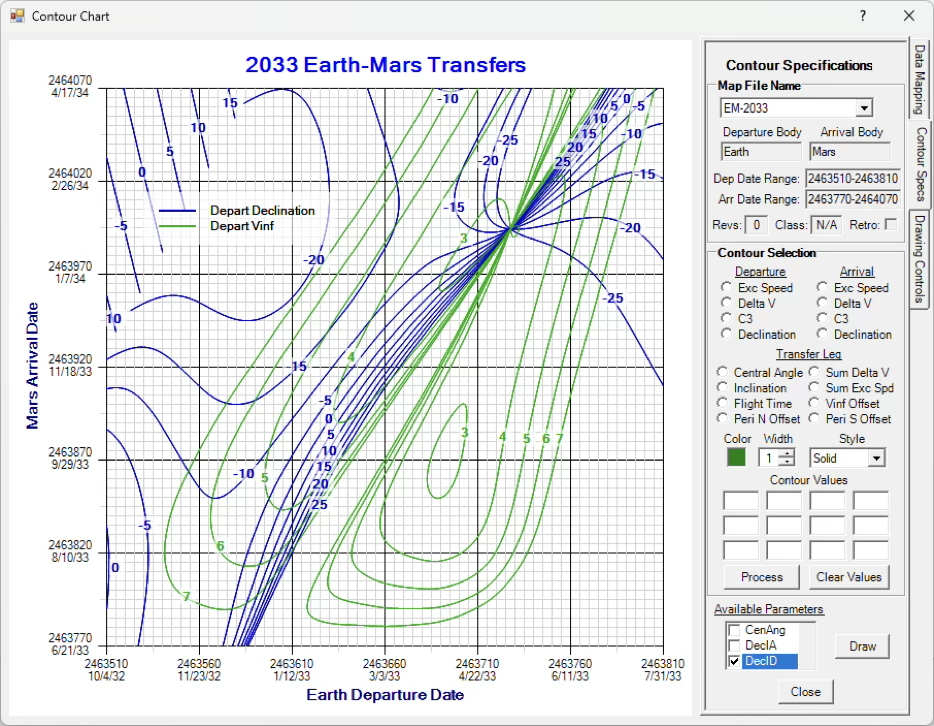
Note that the contours of energy related parameters (excess speed, C3 and Δv) have closed contours, exhibiting the form that contributes to the common term, “porkchop plot”. Other parameters rarely display closed contours; their lines are more appropriately described as “spaghetti strings”.
One will note that there are three tabs along the right side of the control panel. Each of the tabs provide controls for different functions of the application. The upper tab is used to create a file of Lambert problem solutions over ranges of departure and arrival dates at a specified interval. The middle tab (shown above) provides the controls for creating and drawing contours of several values of one or more parameters and save the results for later use. The lower tab allows one to modify the grid width and height and the number and distribution of major and minor gridlines. It also permits the addition of text annotations and a chart title and to print or save the drawing in various file formats, including scripts.
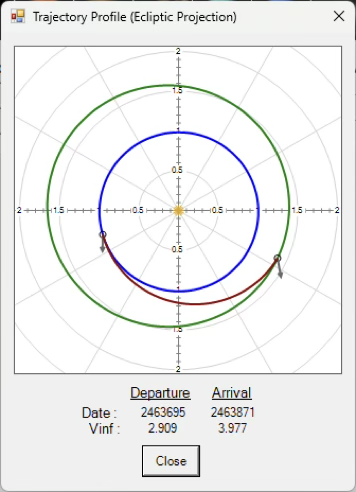
A useful feature in the application is the ability to quickly visualize the transfer trajectory at any given departure date/arrival date pair. By placing the mouse cursor at any point over the grid and pressing the right mouse button, there will appear a popup window showing the trajectory corresponding to that point. An example of this is shown in the figure on the right.
Documentation
Documentation for the high-thrust module of MAnE is provided in a variety of forms.
- Help files are provided for all Windows forms displayed by the application. They are accessed with a ‘?’ button located next to the Close button on the title bar of forms. Clicking this button results in the display of a Word document explaining the purpose and use of the form.
- Additional information for a specific form is provided at the button labeled ‘Quick Tips’ located at the right end of the main menu bar. This feature is provided for each of the tab pages hosting the input variables needed to fully describe a mission. It’s purpose is to alert the user to features on the form that are not visible, such as the existence of context menus available for some text fields.
- Descriptions of standard output reports are at Reports/Output Reports Descriptions on the menu bar.
- Additional documents are available at Resources on the menu bar
- Tooltip balloons are provided for each active text entry field on all Windows forms to describe the purpose of the field.
System Requirements
MAnE is a 64-bit Windows Forms application running on the Windows 11 platform. It is licensed for use by all user accounts on a single workstation. For successful operation, MAnE requires that the workstation also host the Word and Excel applications of Microsoft Office. Acceptable performance of the high-thrust module of MAnE is achieved with virtually any current laptop or desktop computer that is capable of running the Windows 11 operating system.
Overview
The MAnE Low-thrust Module is a system of software tools, seamlessly integrated within a graphical user interface, to support the analysis and optimization of multiple leg, heliocentric missions which employ electric propulsion as the principal mode of thrusting. Full optimization of missions with up to 14 distinct legs is supported. The calculus of variations is the optimization method employed. Hereafter, we refer to the low-thrust module simply as MAnE.
The trajectory optimization component of MAnE has a heritage that spans five decades. Earlier versions, known as HILTOP, were employed in numerous NASA and industry studies of missions to all the planets and to many comets and asteroids in different mission opportunities. HILTOP has been validated by direct comparison of results with other industry software and has been employed by the developer in various New Frontiers and Discovery class mission proposal developments. Experiences gained with these exercises were used to refine the product to perform more effectively and efficiently in typical situations encountered by a mission analyst.
The development of the low-thrust module of MAnE began in 2004 as an effort to re-develop and update HILTOP using modern development tools and to add the graphical user interface. The first fully operational system that includes all components, documentation and example cases was released in September 2017, following extensive testing over a wide variety of missions. The most recent release of the software, which includes numerous upgrades and extensive testing, was released in January 2024.
SpaceFlightSolutions™ places high priority on the integrity and usability of its software products. Numerous data dependent internal tests are performed during operation to monitor validity of results being calculated and messages are logged of all significant events encountered as a record for subsequent evaluation. Additionally, program options are provided that allow the user to test the optimality of the converged results. A variety of documentation features at the field, form and concept levels are provided to support the learning process for becoming productive in its use.
Licensing of Low-thrust Module is required for each individual workstation on which the application is to be executed. Licenses are perpetual and include one year of support and version upgrades that are released during that time. Continuation of support is available via annual subscriptions. Contact SpaceFlightSolutions for current licensing and support fees.
™SpaceFlightSolutions, MAnE and HILTOP are trademarks of Jerry L. Horsewood
Features
- A robust, flexible, multiple leg mission optimization program suitable for preliminary mission studies of both manned and unmanned solar system missions employing either nuclear or solar electric propulsion;
- Hybrid propulsion options employing chemical propulsion stages for launch or capture at final target and electric propulsion for the heliocentric transfer; also, analytic algorithms are used to estimate propellant and time requirements for optional low-thrust escape for the launch body and/or capture at the final target;
- Comprehensive spacecraft and propulsion system models support detailed system design;
- Three propulsion models are offered – the Classic model assumes constant specific impulse and efficiency throughout the trajectory, the Smooth model employs polynomial definitions of thrust and mass flow rate as a function of input power to the PPU, and the Stepped model requires that thrusters operate only at predefined, discrete set points;
- The number of operating thrusters at any point in time is determined optimally, subject to input minimum and maximum values;
- The power model includes provisions for power decay/degradation as a function of time;
- Interfaces to the DE430 planetary ephemeris file and the comprehensive Dastcom5 ephemeris files with the orbital elements of over 1 million asteroids and comets that are maintained at and available from JPL.
- Supports the acquisition and use of Spice kernel ephemeris files for small bodies from JPL;
- Interfaces to and includes editors for six MS Access databases containing input data for previously converged mission solutions, performance data for thrusters, solar arrays and launch vehicles, spice kernel ephemeris files for small bodies, and orbital elements of user defined bodies;
- Supporting applications to evaluate various events, conditions and information (such as nodal crossings, alignments, close approaches, and locations of solar system bodies) that are useful in the analysis of typical missions;
- An application to interrogate the comet/asteroid file for entries with characteristics satisfying a list of inequality constraints;
- A comet/asteroid mission building application that isolates near encounters (within a specified threshold distance) of the spacecraft with all or a defined subset of the solar system bodies known to MAnE during a mission and/or a mission extension;
- Applications to support the transfer of solutions, including subsystem performance data and ephemerides, among MAnE installations;
- A graphical application that allows one to experiment with input variables, including initial co-state variable values, for the purpose of improving initial estimates needed to initiate the solution of the boundary value problem;
- An application that automates the appending of previously developed trajectory segments to form an extended mission;
- A generalized graphics application for drawing orbits and trajectories with provisions for text and pointer annotations, zooming in and out, and repositioning;
- Provides for saving the drawings of orbits and trajectories in three bitmap formats as well as a script format the permits reproduction of a saved drawing, including all annotations, in editable form.
- Creates 20+ output files designed for presentation and analysis of mission data.
The User Interface
The GUI provides a common framework within which the many components of the environment are integrated. The framework provides an organized presentation of the input required for a given environment component and a convenient method to execute the component and retrieve the relevant results. This visual approach enhances understanding of the component and of the problem being addressed and significantly reduces instances of missing or erroneous inputs.
When MAnE is started, mission input data from the most recently executed case populates the input forms of the GUI. The initial form displayed is known as the Mission Overview form, an example of which is shown below. This form displays the itinerary of the mission as presently defined. Targets in the itinerary may be added, removed or changed. The icons in the target ribbon are active and are used to specify the target of interest at a given node. The option buttons at the top permit the selection of models to be used for evaluating trajectories; the choices made here affect the content and display of data of subsequent forms; that is, data items that become inapplicable for certain models are either hidden or deactivated to aid the analyst in the efficient use of MAnE. To assist new users, the purpose of each active control on all forms are described in a tooltip that is displayed when the mouse hovers over the control.
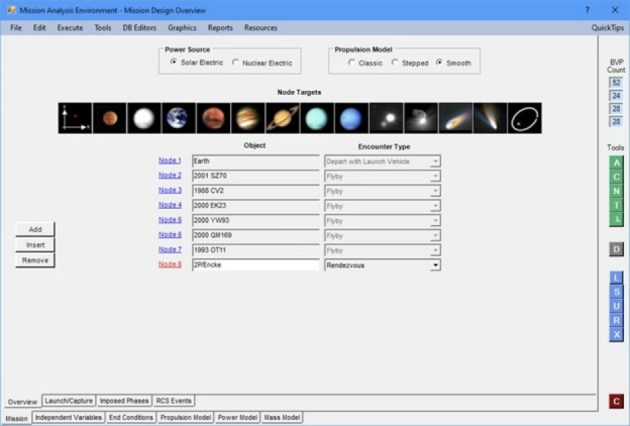
Several artifacts of the above form are common to all of the data entry forms. These include the bar menu at the top, the boundary value problem counts for the problem as currently defined, the toolbox of green, grey, blue and red buttons on the right, and the tabs along the lower border. The bar menu and sub-menu items provide access to all supporting applications, database editors, graphics features, data reports, documentation and help files. With few exceptions, accessing any of these features results in the display of an additional form with its own set of controls and data. The toolbox provides quick access to the most frequently used applications and functions, which are also accessible from the bar menu. The tabs provide a mechanism for categorizing input parameters into meaningful sub-groups. By processing the tabs from left to right, one is assured that the adaptive forms properly reflect the effects of choices and decisions made on prior forms.
The group of green icons in the toolbox are used to quickly access support applications frequently used while performing mission studies. From the top, the first three applications evaluate Alignments, Closest approaches, and Nodal crossings of any two bodies that occur within a specified time interval. Next is an application that converts between calendar and Julian Dates, and the final icon in the group is the Lambda Lab, an application that allows one to vary the values of the independent variables and immediately observe the effects on the trajectory profile. It is a powerful tool for improving initial estimates of independent variables to initiate the solution to the boundary value problem.
The single grey icon is used to access the feature to Draw the orbits and trajectories of one or more missions, to annotate the drawing with text and arrows, and to save the drawings in various formats.
The blue icons in the toolbox deal with the mission definition currently loaded in the user interface. From the top, their purposes are to Load a mission from the mission database into the user interface, Save the currently defined mission to the missions database, Update the independent variables to the values at the end of the most recent execution, open Reports of results from the most recent execution, and eXecute the mission currently defined in the user interface. The red button is used to close MAnE.
Additional features are available from the menus. These include transferring and receiving mission solutions developed on other computers that host MAnE, interrogating ephemerides and displaying tabular and graphical results, searching for near encounters of small bodies along a trajectory, appending trajectory segments to extend a mission, documentation at the form and application levels, output report descriptions, analysis guidance and troubleshooting tips, and example cases.
Trajectory Optimization
The MAnE gravitation model iss based upon the zero sphere of influence patched conic model of the solar system; that is, heliocentric trajectories are computed under the assumption that the sun is the only attracting body. Once the terminal heliocentric velocities are known, the velocities relative to the terminal body are evaluated and equated to planetocentric conditions at infinity. This method is alternatively referred to as “matched asymptotes”. It is generally regarded as sufficiently accurate for purposes of preliminary mission analysis and for propulsion system sizing and selection. This model is virtually identical to that employed in the high-thrust module of MAnE.
Trajectory optimization is achieved with the indirect techniques of the Calculus of Variations. While the solution to the boundary value problem that results with this approach is considered by many to be overly difficult, the robust iterator that is used in the program, combined with the innovative tools incorporated in MAnE substantially reduces the severity of the problem. Advantages of indirect techniques are that convergence tends to be quadratic in the neighborhood of the solution and that convergence assures that the solution is locally stationary. Additionally, indirect methods permit identifying far more detailed optimal thruster operational conditions than direct methods that are currently available.
The ultimate boundary value problem to be solved is comprised of an equal number of independent variables and end conditions. The end conditions are, in turn, comprised of the constraints that are specified for the problem and the applicable natural boundary, or optimality, conditions for the problem posed. The natural boundary conditions are automatically formulated within MAnE so that the user need not be concerned with specifying those that apply. This is but one of the many user-friendly features encoded in MAnE to significantly reduce the learning curve for productive use. For those users that become more proficient with the programs use, provisions exist to override the internally selected natural boundary conditions.
Utilities & Support Tools
A typical mission analysis involves functionality beyond the realm of trajectory optimization and this additional functionality is provided with several supporting application programs that are delivered as a part of MAnE. Specific support tools that are presently included are:
- Export and import solutions to transfer between the user interfaces on separate computers;
- Transfer and install multiple solutions between the Mission databases on separate computers;
- Interrogate ephemerides to determine locations of bodies on a specific date, obtain orbital elements, and graphically display orbit profiles;
- Search the small bodies data files for all objects whose orbital or physical characteristics satisfy a prescribed set of inequality constraints;
- Determine the dates of opposition and conjunction of two bodies during a specified time interval and optionally display the orbit profiles showing the longitudes of any subset of the events;
- Determine the dates of closest approach of two bodies during a specified time interval and optionally display the orbit profiles showing the positions of the two bodies for any subset of the events;
- Determine the dates of nodal crossings of a body on the orbit of a second body during a specified time interval and optionally display the orbit profiles showing the longitudes of any subset of the events;
- Perform conversions between calendar and Julian dates as well as calculations involving dates in either format and time intervals;
- Append a trajectory segment, potentially consisting of multiple legs, that is represented by an existing solution in the Missions database to a current trajectory segment to create an extended mission;
- Search the small bodies database for near encounters with the spacecraft as the spacecraft traverses its trajectory and create a report of the results;
- Alter individual values of the independent variables of the currently defined mission and immediately display the effects on the resultant trajectory;
- Manage and maintain the six Access databases (Missions, launch vehicles, solar arrays, thrusters, spice kernels, and user defined bodies) and, for launch vehicles and solar arrays, evaluate polynomial coefficients used to evaluate performance at runtime;
- Create graphical displays of the orbits and trajectory of a mission that may include text annotations with complete control over font size, style, color and placement, pointer annotations with or without arrowheads on either end, and the ability to resize and reposition the drawing on the canvas;
- Automatically display output reports in Notepad, Excel or Wordpad, as appropriate.
Visualization Support
MAnE includes a general purpose orbit and trajectory profile drawing feature that is employed in several applications. Here are a few examples:

– Display/print ecliptic plane projections of solar system body orbits and spacecraft trajectory.
– Display while optimizing a trajectory.
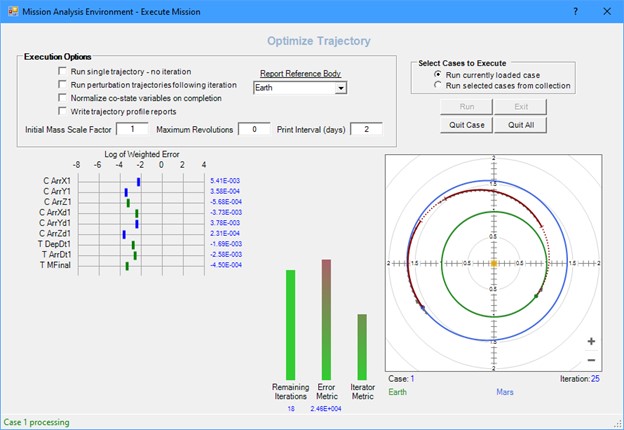
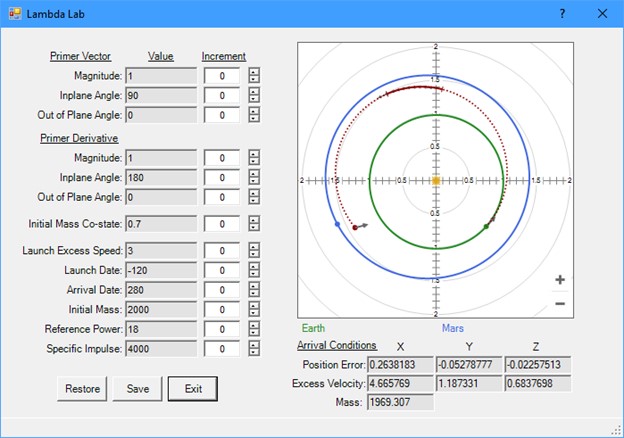
– The Lambda Lab.
– Orbit of ephemeris body.
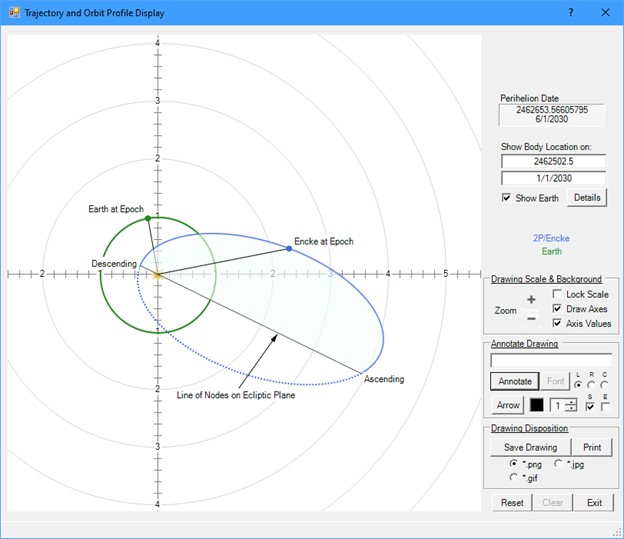
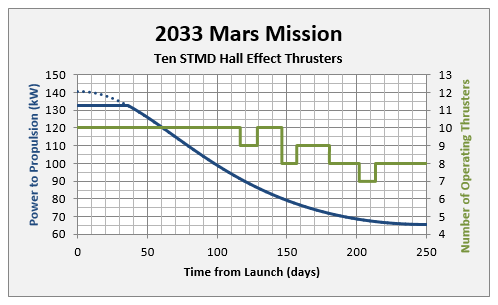
– Within MAnE v4.0, many of the standard reports are automatically opened in MS Office Excel. This makes available all the graphics features of the spreadsheet program for use with the data in the report. Following is an example of a graph of propulsions system parameters as a function of time for a mission to Mars.
Documentation
Documentation of MAnE is provided electronically in a variety of formats and is installed on your hard disk along with the software.
- At the field level of forms, hovering the mouse over an active control (text fields, buttons, check boxes, etc.) exposes a tooltip that describes the purpose of the control;
- On all of the mission input data forms (i.e., those forms exposed with the tabs at the bottom), there appears the active text “Quick Tips” at the right side of the bar menu. When this text is clicked, a dropdown box displays a list of features on the currently displayed form that are not immediately evident, such as the availability of context menus.
- At the form level, clicking the ‘?’ symbol on the right side of the title bar (next to the Close button ‘x’) results in the display of a help file that describes the purpose and use of the form. Links appear frequently in these files to provide ready access to related information, as appropriate;
- An overview document serves as a user’s guide that links to the help files for details;
- A technical document provides a mathematical formulation of the low-thrust module;
- Articles are included that explain the purpose and function of co-state variables and provide guidance for estimating initial values required for the solution of the boundary value problem;
- Additional articles are included that provide troubleshooting tips to resolve boundary value problem convergence issues;
- Example missions are included with full explanations of how they are solved;
- A stand-alone installation guide is provided that explains the process for new and subsequent installations.
System Requirements
MAnE is a 64-bit Windows Forms application running on the Windows 11 platform. It is licensed for use by all user accounts on a single workstation. For successful operation, MAnE requires that the workstation also host the Word and Excel applications of Microsoft Office. Acceptable performance of the high-thrust module of MAnE is achieved with virtually any current laptop or desktop computer that is capable of running the Windows 11 operating system. That said, the low-thrust module is more compute intensive than its high-thrust counterpart in that it requires numerical integration of all trajectories. For that reason, performance is improved with increased memory and fast processor speeds.